DomainKeys (DK) y DomainKeys Identified Mail (DKIM) son
métodos de valicación de correo electrónico que permiten validar y firmar, mediante firma digital (clave pública y clave privada), los correos entrantes y salientes de nuestro servidor de correos. Esto permite que un dominio sea responsable por los correos que se envien a través de el para asegurarse que lleguen al inbox o que, de lo contrario, lleguen directo al junk.
Para validar la autenticidad de un remitente existen varias formas a nivel de dominio (dns) como es el SPF, Sender-ID, DK y DKIM.
Este último tiempo he estado trabajando con postfix validando los correos salientes para llegar al inbox de los servidores de correo más populares como Gmail, Yahoo! y Hotmail (msn, live, etc).
Estuve analizando las especificaciones RFC de cada
protocolo (
RFC4870 - DK;
RFC4871 - DKIM), probandolas e implementandolas, llegando a distintas conclusiones. Básicamente, el diagrama de funcionalidad es el siguiente:
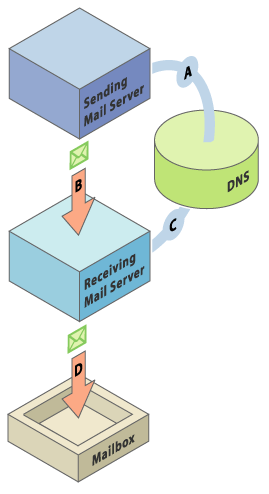
En simples palabras, el correo pasa por un filtro antes de ser enviado por el servidor, el que verifica que el correo cumpla los parametros segun una configuracion especifica y si todo esta ok, entonces lo firma y lo entrega. El recipiente, al ver que existe un header de domainkeys o dkim, hace una peticion a la clave publica que esta en el dns (como registro TXT) del dominio, segun los parametros pasados en el headerm, hace los chequeos correspondientes y si todo esta ok, entonces lo deja entrar.
Básicamente un header DK o DKIM está formado por un selector, que es el "nombre" que se le da a la clave para ese dominio, esto permite tener varias claves para varios dominios con sus respectivos selectors. El selector especificado en el header del correo debe existir como registro TXT en la zona del dominio (en el dns) de lo contrario no será validado. Seguido del dominio quien firma el correo, el tipo de encriptacion y voluntariamente, los headers que se firmarán. Algo mas o menos asi:
DomainKey-Signature: a=rsa-sha1; s=SELECTOR; d=DOMINIO.org; c=simple; q=dns;
b=NxbpGHnMKAqHiSwH5T70YLdU9ZA4GbpNG3xp+KAaYphAqpPcqByssIIqKxsN/uhg6
shbEP2CyQew2uJRERi22w==
Tipo de encriptación (el hash) rsa-sha1, selector SELECTOR, d (dominio) dominio. Eso es lo básico, pero existen más parametros para agregar a los headers:
OPTIONS
-a peerlist
Identifies a file of "peers" which identifies clients whose con-
nections should be accepted without processing by this filter.
The peerlist should contain on each line a hostname, domain name
(e.g. ".example.com"), IP address, an IPv6 address (including an
IPv4 mapped address), or a CIDR-style IP specification (e.g.
"192.168.1.0/24").
-A Automatically re-start on failures. Use with caution; if the
filter fails instantly after it starts, this can cause a tight
fork(2) loop.
-b modes
Selects operating modes. modes is a concatenation of characters
which indicate which mode(s) of operation are desired. Valid
modes are s (signer) and v (verifier). The default is sv.
-c canon
Selects the canonicalization method to be used when signing mes-
sages. When verifying, the message's DomainKey-Signature:
header specifies the canonicalization method. The recognized
values are nofws and simple as defined by the DomainKeys draft.
The default is simple.
-C config
Configuration control. See the CONFIGURATION section for
details.
-d domain [,...]
A comma-separated list of domains whose mail should be signed by
this filter. Mail from other domains will be verified rather
than being signed.
If the value of this parameter starts with a "/" character, it
is assumed to be a filename from which the domain list will be
read, one per line, with "#" characters indicating the beginning
of a comment.
In either case, the domain name(s) may contain the special char-
acter "*" which is treated as a wildcard character matching zero
or more characters in a domain name.
-D Sign subdomains of those listed by the -d option as well as the
actual domains.
-f Normally dk-filter forks and exits immediately, leaving the ser-
vice running in the background. This flag suppresses that be-
haviour so that it runs in the foreground.
-h Causes dk-filter to add a header indicating the presence of this
filter in the path of the message from injection to delivery.
The product's name, version, and the job ID are included in the
header's contents.
-H Includes on DomainKey signatures the list of headers that were
included in the signature. This makes the signature header
larger by explicitly listing the included headers, but this also
allows verifying agents to ignore headers that were added in
transit.
-i ilist
Identifies a file of internal hosts whose mail should be signed
rather than verified. Entries in this file follow the same form
as those of the -a option above. If not specified, the default
of "127.0.0.1" is applied.
-I eilist
Identifies a file of "external" hosts which may send mail
through the server as one of the signing domains without creden-
tials as such; basically suppresses the "external host (host-
name) tried to send mail as (domain)" log messages. Entries in
this file follow the same form as those of the -a option above.
-k Causes -s to be interpreted as the location of a key list, which
is a file listing rules for signing with multiple keys. The key
list should contain a set of lines of the form sender-pat-
tern:keypath where sender-pattern is a pattern to match against
message senders (with the special character "*" interpreted as
"zero or more characters"), and keypath is the path to the PEM-
formatted private key to be used for signing messages which
match the sender-pattern. The selector used in the signature
will be the filename portion of keypath.
-l Log via calls to syslog(3) any interesting activity.
-m mta [,...]
A comma-separated list of MTA names (a la the sendmail(8) Dae-
monPortOptions Name parameter) whose mail should be signed by
this filter. There is no default.
-M macro[=value][,...]
Defines a set of MTA-provided macros which should be checked to
see if the sender has been determined to be a local user and
therefore whether or not the message should be signed; if a
value is specified, the value of the macro must match the value
specified (matching is case-insensitive), otherwise the macro
must be defined but may contain any value. The list is empty by
default.
-o header [,...]
A comma-separated list of headers which should not be signed.
Ignored when verifying.
-p socketspec
Specifies the socket that should be established by the filter to
receive connections from sendmail(8) in order to provide ser-
vice. socketspec is in one of two forms: local:path which cre-
ates a UNIX domain socket at the specified path, or
inet:port[@host] which creates a TCP socket on the specified
port. If the host is not given as either a hostname or an IP
address, the socket will be listening on all interfaces. This
option is mandatory.
-P pidfile
Writes the process ID of the filter, once started, to the file-
name given.
-q Requests that messages which fail verification be quarantined by
the MTA. (Requires a sufficiently recent version of the milter
library.)
-R When a signature verification fails and the signing site adver-
tises a reporting address (i.e. r=user@host in its policy
record), send a structured report to that address containing
details needed to reproduce the problem.
-s keyfile
Gives the location of a PEM-formatted private key to be used for
message signing.
-S selector
Defines the name of the selector to be used when signing mes-
sages. See the DomainKeys specification for details.
-T secs
Sets the DNS timeout in seconds. A value of 0 causes an infi-
nite wait. The default is 5. Ignored if not using the asyn-
chronous resolver package. See also the NOTES section below.
-u userid
Attempts to be come the specified userid before starting opera-
tions.
-U popdb
Requests that the filter consult a POP authentication database
for IP addresses that should be allowed for signing. The filter
must be specially compiled to enable this feature, since it adds
a library dependency.
-V Print the version number and exit without doing anything else.
CONFIGURATION
The value of the -C switch is a comma-separated list of settings of the
form result=action which defines what the filter should do with mes-
sages that produce certain results. Each result and each action has a
full name and an abbreviated name. Either is accepted. Below, the
abbreviated name appears in parentheses.
results
badsignature (bad) the signature found in the message did not
verify successfully against the message; dnserror (dns) an error
was encountered attempting to retrieve a public key from the
nameserver; internal (int) an internal error occurred; nosigna-
ture (no) no signature was present on the message; signature-
missing (miss) no signature was present on the message which
claims to sign all messages.
action accept (a) accept the message; discard (d) discard the message;
tempfail (t) temp-fail the message; reject (r) reject the mes-
sage.
No explicaré como montar un servidor postfix con domainkeys o dkim, solo intento explicar el funcionamiento y las posibilidades que nos permite este sistema de firmas digitales para nuestros correos. Quizás más adelante exponga un documento completisimo de como montar un mail server con estas caracteristicas.
Enlaces:
RFC4870
RFC4871
DomainKeys Identified Mail HomePage
Documento explicativo sobre las DomainKeys
Como implementar DomainKeys en postfix
Saludos
Saludos!
<a href="http://www.sohiking.com/discount-under-armour-curry-basketball-shoes-men-blue-red.html" title="under armour heatgear socks" rel="nofollow">under armour heatgear socks</a>
Our company offers herb-based supplements. Look at our health contributing portal in case you want to look healthier. Our company offers a wide variety of non prescription products. Visit our health site in case you want to look better with a help of generic supplements. Our company offers supreme quality healthcare products. Look at our health contributing portal in case you want to improve your health. Our company offers a wide variety of non prescription products. Visit our health portal in case you want to to feel healthier with a help of general health products. Our company provides supreme quality pills. Visit our health contributing site in case you want to feel healthier.